Wiring Scenarios
Reference wiring notes for the most common DragonFly door configurations. Each scenario below is a short, plain-language description of how the lock, relay, power, and any sensors relate — not a substitute for a licensed installer.
Installation is performed by DragonFly / a qualified installer
Physical wiring, lock selection, and fail-safe vs fail-secure behavior are decided at installation time based on your door and your local fire/life-safety code. The notes here explain how the pieces fit together so you can understand and troubleshoot your system — always confirm exact voltages, fail modes, and egress requirements with your installer before changing anything.
For the terminal pinout, relay types, and power tables, see Hardware Setup. For sensor concepts in plain terms, see the Hardware FAQ.
Full Wiring Overview
A typical single-door install: the lock connects to The Box's relay terminals, power is supplied either by the built-in wet relay or by a separate supply through a dry contact relay, and the Barcode Reader connects over the Orange Reader Cable. The Box itself is powered over the network via PoE.
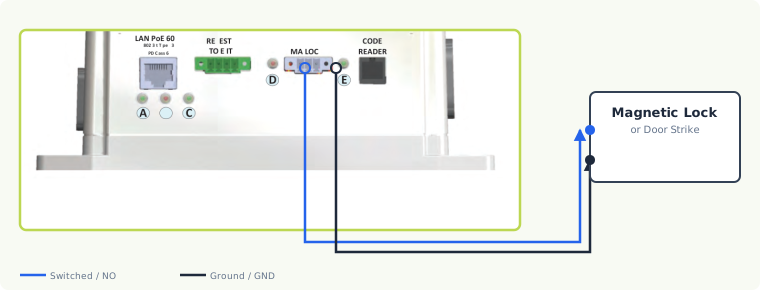
The core relay terminals on The Box are:
| Terminal | Connect to |
|---|---|
| NO | Door strike positive (wet relay) or relay switch output (dry) |
| COM | Power supply positive (wet relay) or relay common (dry) |
| GND | Power supply negative and lock negative |
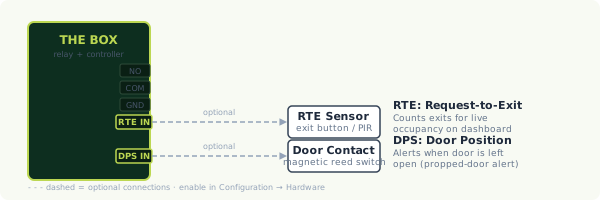
| RTE IN | Request-to-Exit sensor (optional) |
| DPS IN | Door position sensor (optional) |
Single Maglock
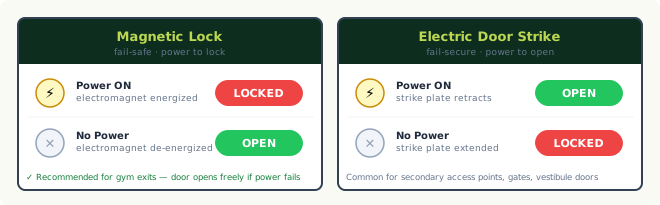
A magnetic lock holds the door closed while it is powered and releases when power is cut. Most single maglocks run directly off the built-in wet relay (12V, up to 1.5A), so The Box powers the lock and no separate lock supply is needed. If the maglock needs 24V or more than 1.5A, wire it through a dry contact relay with a separate power supply sized to the lock:
- The dry contact relay switches the maglock's power circuit; it does not supply the power itself.
- Match the supply voltage to the maglock (12V or 24V DC).
- On dry contact maglock installs, install a Schottky diode across the maglock terminals (reverse-bias: cathode to positive, anode to negative) to absorb the flyback voltage spike a maglock produces when power is cut. See the warning in Hardware Setup → Dry Contact Relay.
The diagram below compares how a magnetic lock and an electric strike behave with and without power (fail-safe vs fail-secure):
Double Maglock
Two magnetic locks — for example a pair of doors, or a single wide opening secured at both leaves — are switched together from one relay, each fed from an appropriately sized power supply. Because two maglocks roughly double the current draw of a single lock, the built-in wet relay (12V, 1.5A) is not sufficient; use a dry contact relay with an external supply rated for both locks.
As with a single maglock, install a Schottky diode across each lock's terminals to suppress flyback.
Diagram coming soon
Wiring diagram for this scenario is in progress.
Wet vs Dry Relay Configuration
The choice between the built-in wet relay and a dry contact relay comes down to whether The Box should supply lock power directly, or only switch a separate power supply.
- Supplies power directly to the lock: 12V DC only, 1.5A maximum.
- Covers most single maglocks and door strikes; the network cable is the only power source needed at the door.
- Not for double maglocks, 24V locks, or locks drawing more than 1.5A — use a dry contact relay for those.
- Wiring: lock to NO, supply positive to COM, negatives to GND.
- Switches the circuit only; does not supply power.
- Voltage is your choice — 12V or 24V DC — matched to the lock.
- Required for double maglocks and any lock needing 24V or more current than the wet relay provides.
- Wiring: relay switch output to NO, relay common to COM; the external supply and lock share GND.
- Add a Schottky diode across the lock terminals on dry contact maglock installs.
Diagram coming soon
Wiring diagram for this scenario is in progress.
Mechanical Strike
An electric door strike replaces the fixed strike plate with an electrically controlled one: when energized (or de-energized, depending on the model's fail mode) the latch releases so the door can be pushed open. Electric strikes are typically 12V and draw roughly 500mA–1A, which the built-in wet relay can drive directly (lock positive to NO, supply positive to COM, negatives to GND).
Whether a strike is fail-safe (unlocks on power loss) or fail-secure (stays locked on power loss) depends on the specific strike model — confirm this against your egress and fire-code requirements. See the lock-type comparison diagram under Single Maglock.
Electromechanical Crash Bar (Exit Device)
An electrified exit device (crash bar / panic bar) provides free mechanical egress from the inside — pushing the bar always lets someone out — while its latch is electrically controlled for entry from the outside. DFACS controls the electric portion the same way it controls any other lock: through the relay.
Because exit-device wiring varies significantly by manufacturer and model (operating voltage, current inrush, fail-safe vs fail-secure behavior, and whether a separate power transfer hinge or door loop is required), the exact connections must come from the device's own documentation and your installer.
Egress and fire code are safety-critical
Exit devices exist to guarantee people can always get out. Never wire an exit device in a way that could impede mechanical egress. Confirm the configuration with your installer and against local fire/life-safety code.
Diagram coming soon
Wiring diagram for this scenario is in progress.
Request-to-Exit (RTE) Device
A Request-to-Exit device — a motion sensor or push button mounted on the inside — lets someone leave without scanning, and can also count exits for real-time occupancy tracking.
- Connect the RTE sensor output to the RTE IN terminal on The Box (green terminal block, marked D on the front panel).
- In Configuration → Hardware, enable RTE Count and set the RTE mode to match your sensor (NO or NC).
- When enabled, DFACS tracks entries and exits and shows a live occupancy count on the dashboard.
Door Position Sensor (DPS)
A door position sensor is a magnetic contact (reed switch) that reports whether the door itself is physically open or closed, independent of the lock state — useful for propped-door alerts.
- Connect the contact to the DPS IN terminal on The Box (same green terminal block, marked D).
- In Configuration → Hardware, enable Door Position Sensing and set the DPS mode (NO or NC).
- If the sensor reports the wrong state (open vs closed), swap the NO/NC setting.
The RTE/DPS wiring diagram is shown under Request-to-Exit (RTE) Device above — it includes both the RTE IN and DPS IN connections.
Bond / BOND Sensor
A bond sensor confirms that the lock mechanism itself is actually engaged ("bonded") — a more precise signal than simply "we sent the lock command." Many magnetic locks include a built-in bond (lock status) output for exactly this purpose.
The bond signal connects as an auxiliary input on The Box and is selected as the auxiliary sensor type in Configuration → Hardware (with an NO/NC setting to match the lock's bond output).
Diagram coming soon
Wiring diagram for this scenario is in progress.